

If you are planning to take the TOPIK test in Korea, you can register for it Online. If you are living in any other country you will have to contact the Korean embassy, Korean Cultural Center or affiliate institutions. They will help you with the registration.
You can find the information about the next TOPIK Test on THIS PAGE. You can also download the past TOPIK papers or take a mock test on our website.
Register for the Next TOPIK Test in Korea
TOPIK Test Registration in Your Country

Once you've opened the official website of TOPIK you can change the language of your choice from the options provided.
Follow the step mentioned below to Register for TOPIK on the Official TOPIK Website :
STEP 1 : Login
If you look at the top right corner of the site, you will 로그인 (Log in) and 회원가입(Sign Up) menu options. If you haven’t created an account on TOPIK site already you will need to click on 회원가입 and sign up. If you already have your ID and Password, just 로그인.
You can do that by clicking HERE !!

STEP 2 : Register
Click on 시험접수 or "Register for TOPIK" button on the left corner of the page which will directly take you the next page.
Check the schedule for the application period. If it is not the application period, you cannot register.
Click on 접수하기 for starting the registration process.

STEP 3 : Select test center
Now choose the test site. Search for the test site you want or check the list of test sites available.
Click the test level you want to appear for.
The number of applicants who have applied for the test is indicated. Note that you cannot choose a test center that has already reached its full capacity. Once the seats are full applications will no longer be accepted.

STEP 4 : Enter Information
Check the registration information, including the test level and test center under 시험접수정보.
Enter your personal information under 개인정보 입력 and click the 다음단계 button.

STEP 5 : Upload Photo
Upload a photo file by clicking the 사진 수정/등록하기 "Edit/Upload Photo" button.
Make sure that the photograph you are trying to upload meets the requirements. If your identity cannot be confirmed based on the photograph you have provided on the day of testing, you might be penalized.

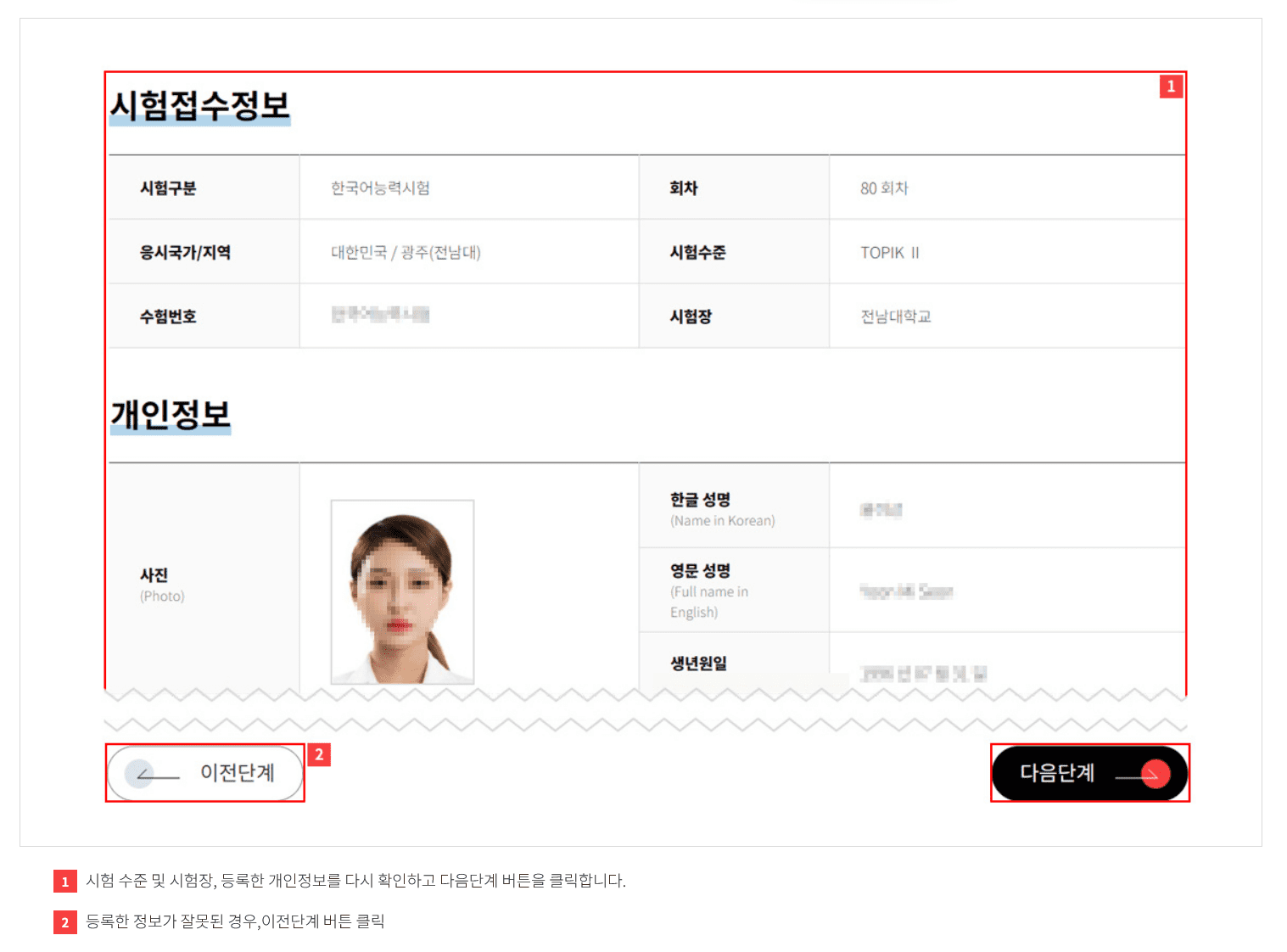
STEP 6 : Check/Edit Information
Check the test level, test center, and registered personal information again and click the 다음단계 button for final payment.
If the registered information is incorrect, click the 이전단계 button which will take you to the previous page.
STEP 7 : Pay registration fee
You can pay the registration fee either by credit card 신용카드 or by bank transfer 가상계좌 (virtual account).
If you choose to pay by bank transfer (virtual account), you must enter the information required in case of a refund. In the case of bank transfer (virtual account), a unique account number is assigned to each individual, so make sure to accurately enter the account number assigned specifically to you.

STEP 8 : Check registration details
Check whether your transaction and registration were successful.
Your registration details can be viewed on the Registration Status page under My Page "마이 페이지"

You’re done! Now go to This Page, download previous TOPIK papers, check some other study material and tips on our Resource Page and get ready for study.
Prepare for TOPIK with a clear plan
Our packages give you step-by-step courses for every section of the test. Each package also has a Practice Test Bank of original practice sets with explained answers.
TOPIK I Complete Package
- It has 6 courses, including the Foundation Course in Korean.
- You get 10 original practice sets for Reading and for Listening.
TOPIK II Complete Package
- It has 6 courses, including the Writing Masterclass.
- You get 10 original practice sets for Reading, Listening and Writing.
Best valueThe All-Access Package has all 17 courses for $99, with 5 years of access.Compare all packages
Every course and package has a 14-day money-back guarantee.
All the best!
